
Live Traffic Tracking for Blogger
4/06/2010 11:27:00 AM
Want to know where are your visitor come from for live? If yes, You Go http://feedjit.com
Easy install to blog and without signup before, grab the code and add to your sidebar and you have a live tracking tool for free.
Below is the example widget from feedjit.com :
How to make breadcrumb navigation in Blogger
4/06/2010 04:40:00 AM
like the following screenshot:
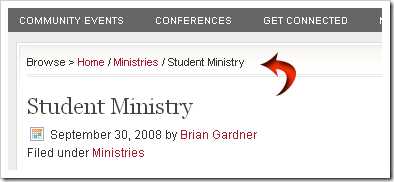
The navigation like above is known better by the name of “breadcrumb-navigation”. With the “breadcrumb-navigation” the readers can easily know the position of an article that’s being read and also can search the articles in the same category.
How to submit blogger sitemap to google
4/05/2010 11:29:00 AM
Sexy Bookmarks v2 For Blogger
4/05/2010 01:11:00 AM
I being a blogger user for quite a long time, still love to give back to the community one way or other. This time again, I have tried to give back to the community by making the new version of Sexy Bookmarks compatible with blogger.
NOTE: !Before changing your template, don’t forget to backup your template and your widgets!
Create a Featured Posts List Using Label Feeds in Blogger
4/04/2010 11:43:00 AM
A little known fact about using Blogger is that each label (category) also emits it’s own feed.This means that readers could easily subscribe to receive posts from a particular label. It also means that blog publishers can use these label feeds to create a featured posts list in their sidebar which updates automatically each time a new post is attributed to this label.
In this post, I’ll explain how easy it is to create a featured posts list in Blogger using your label feeds which will help draw attention to the most important posts in your blog.
How to add related posts below every post
4/04/2010 09:16:00 AM
To add Related posts/Similar posts widget below every post on your blog, follow these simple steps:
First of all download this file:
relatedPosts_ForBlogger2.js
And upload the file (relatedPosts_ForBlogger2.js) to SigMirror.com or HotLinkFiles.com to get a DIRECT LINK to that file.
The Best Random Posts Widget For Blogger Blogs
4/04/2010 08:59:00 AM
Although "Related Posts Widget" and "Popular Posts Widget" are important for all types of blogs, but in blogs where almost all the posts are similar (like blogs with articles on recipes, money-making, computer tricks or automobiles etc.), visitors usually do not mind reading some quite-unrelated posts too. So along with Related Posts widget, a "Random Posts widget" on your blog will help you to increase the number of page impressions.
Adding a Random posts widget is very easy...
Simply log in to Blogger, go to Layout, click on "Add a Gadget", and select it as "HTML/JavaScript" type.
Show Static Pages on current Menu Bar
4/04/2010 08:37:00 AM
This tutorial will help You to show Blogger Static Pages on your previows installed Menu Bar, which most of my templates has one. Check also and images, will help you to make this tutorial easy as it is.
Let Start
How to EDIT Menu Links (ie: About, Contact)
4/04/2010 08:36:00 AM
Menu Links that you see on your blog, actually are on your template code, is not hard to edit, just need to know when you should look on your template code, for this I will show simple tutorial with images.
Lets Go:
How to install a Blogger Template
4/04/2010 08:26:00 AM
Follow Most Simple Guide to Install your Favorite Blogger Template.
Meta Tags For Blogger / Blogspot
4/03/2010 02:53:00 PM
Meta Tags are HTML elements used to provide structured metadata about a web page. Such tags are placed in the head section of an HTML document
We can also add meta tags to Blogger Blogs.But the problem is that having the same meta tags for all pages in your blog is not a good practice.So it would be better if you could add meta tags on your home page only.Just find out the appropriate keywords and description for your site and follow these instructions
Adding Meta Tag For your Blog’s Home Page
Now copy out the following code into a text file
<b:if cond='data:blog.url == data:blog.homepageUrl'>
<meta content="Your keywords separated by commas" name="keywords"/>
<meta content="Your Site Description" name="description"/>
</b:if>